I stopped searching for the perfect app to control my home and manage my day. I built one instead. It’s called Nestor.
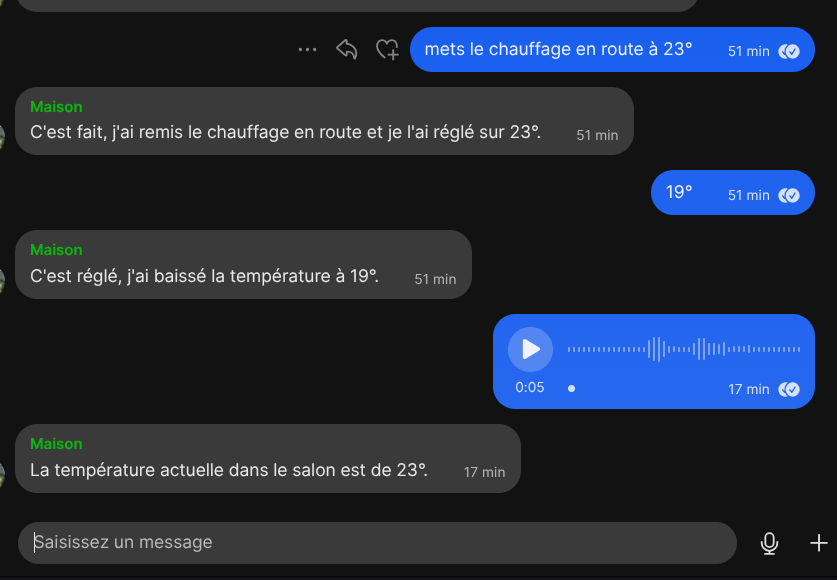
Nestor is a personal assistant accessible from a Signal group. It understands both text and voice, can turn lights on, close the blinds, report the weather, and remembers the conversation thread. It runs entirely self-hosted, without sending my data to Google or Apple.
The problem I wanted to solve
I already use Signal for all my communications. I wanted to avoid installing yet another app to interact with my home automation or ask a quick question to an LLM. The idea: a single entry point, in the app I already have open.
The main constraint was privacy. My Signal messages are end-to-end encrypted. My Home Assistant runs on my own infrastructure. I wanted my assistant to fit that same logic: data that stays at home.
The architecture
Signal (group "NestorAI")
  │
  ├─ Security: AllowList → only the authorised group is processed
  │
  ├─ Text message ───────────────────────────────────────────────┐
  │                                                              │
  └─ Voice message → download → Whisper → transcription ────────┘
                                                                 │
                                                        LLM Agent (Gemma 4 31B)
                                                                 │
                                              ┌──────────────────┴──────────────────┐
                                           Weather                            HASS MCP
                                        (Home Assistant)             (full home automation)
                                                                 │
                                                       Reply → Signal
Four key components: Signal as the interface, n8n as the orchestration engine, Infomaniak AI for the LLM and voice transcription, and Home Assistant for home automation.
Signal as the interface: a deliberate choice
I could have used Telegram, WhatsApp, or a web app. I chose Signal for two reasons.
First, end-to-end encryption is non-negotiable for messages that will contain questions about my home or my schedule. Second, I already use it: no extra app to open, no extra account to manage.
The integration is built on signal-cli and its REST API. n8n connects to this service to receive incoming messages and send replies.
Security is handled by an explicit allowlist: only messages from the group named "NestorAI" are processed. Everything else is silently dropped. The group ID is resolved dynamically at startup — if the group is recreated, the workflow keeps working without any change.
The magic of voice messages
This is the feature that genuinely changes how I interact with the assistant. From my phone, I can send a voice message the same way I would to a friend, and Nestor understands it.
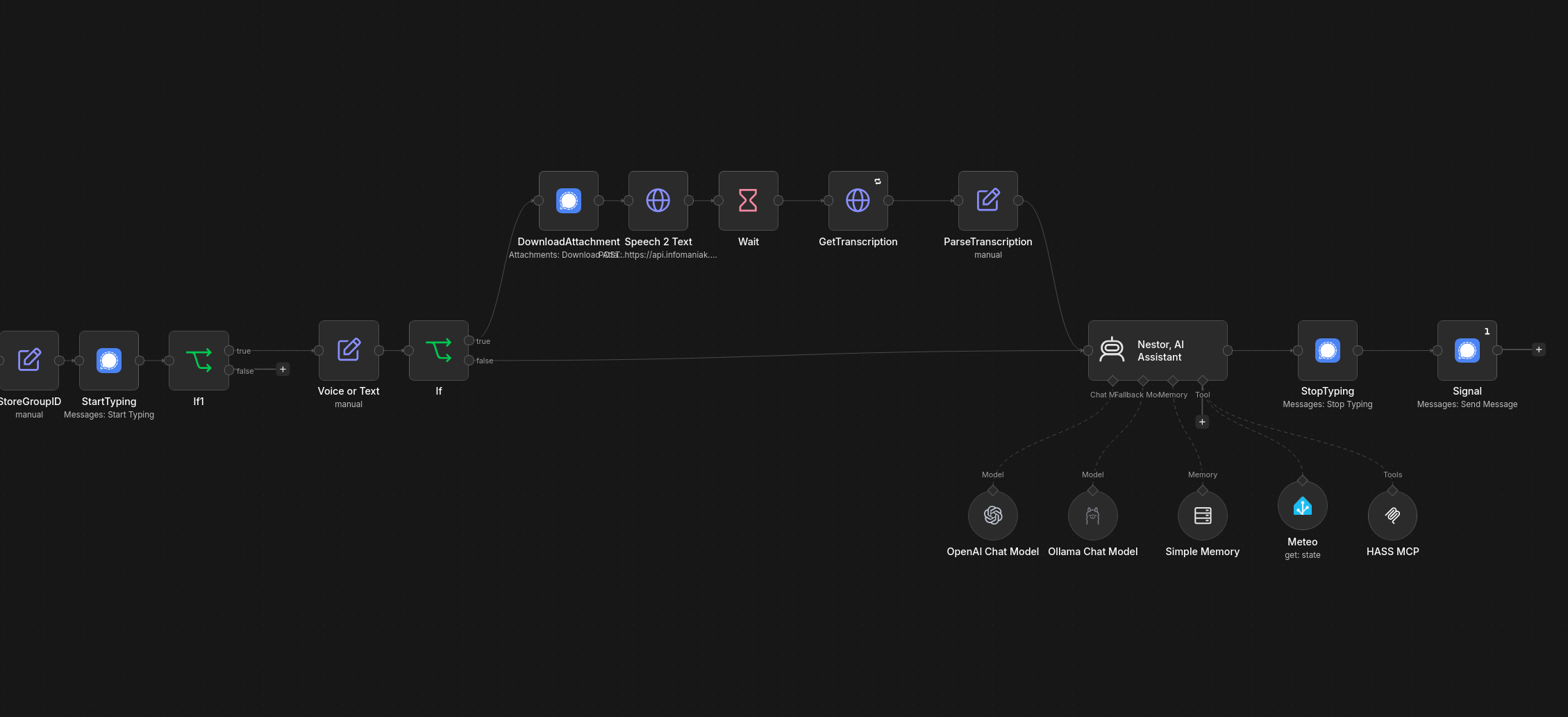
The transcription pipeline runs in five steps:
- Detection: if
messageTextis empty, it’s a voice message - Download: fetch the audio attachment from signal-cli
- Transcription: send the file to Infomaniak’s Whisper API
- Wait + retry: the API is asynchronous — wait 1 s, then poll with up to 5 retries
- Extraction: the transcribed text joins the standard text pipeline
From that point on, it doesn’t matter whether the message was typed or spoken — the same LLM agent handles it.
The n8n workflow
The Nestor agent: memory and tools
The core of the system is an LLM agent based on Gemma 4 31B, served by Infomaniak AI. A local Gemma3 model via Ollama takes over if the primary service is unavailable.
Session memory
Nestor remembers the last 10 exchanges per session. The session key is the sender’s Signal number: each group member has their own context window. No need to repeat “as I said earlier” — Nestor follows the thread.
Available tools
| Tool | Source | Purpose |
|---|---|---|
| Weather | Home Assistant entity weather.<city> |
Current local weather conditions |
| HASS MCP | Home Assistant MCP server (/api/mcp) |
Home automation: lights, blinds, sensors, scenes… |
The MCP (Model Context Protocol) integration is particularly elegant for Home Assistant. Rather than creating one tool per device, Nestor connects to the Home Assistant MCP API and can interact with all exposed devices through a single connection. “Close the living room blinds”, “What’s the temperature in the bedroom?”, “Set the desk light to 40%” — all through the same tool.
Typing indicators
A UX detail that makes a real difference: as soon as Nestor identifies a valid message, it sends the “typing” indicator in Signal. The user knows their message was acknowledged, even while the LLM takes a few seconds to respond. The indicator stops just before the final reply is sent.
Lessons learned
Signal + MCP + LLM = a natural interface for the home. The combination is more ergonomic than I expected. Saying “set the AC to 22 and close the blinds” out loud while standing in the kitchen is more natural than opening the Home Assistant app and navigating to the right controls.
A local fallback is essential. Infomaniak AI has been consistently available in my experience, but having Ollama locally as a safety net changes how you think about the primary service. An outage doesn’t make the assistant useless.
Dynamic group ID resolution. Hardcoding a Signal group ID is a classic trap — it changes when the group is recreated. Resolving the ID at startup via GetGroups and comparing by name makes the workflow much more robust.
Whisper is remarkably accurate. French voice messages are transcribed with very few errors, even in a noisy environment. The asynchronous pipeline with retry handles API latency variations cleanly.
Going further
The full workflow is available on GitHub. To adapt it:
- Change the allowed Signal group: edit the value in the
AllowListnode - Add a tool: wire a Tool node to the
ai_toolinput of the agent — calendar, email, tasks… - Change the LLM: update the model in
OpenAI Chat Model(Infomaniak) orOllama Chat Model - Adjust memory size: update
contextWindowLengthinSimple Memory
The architecture is inspired by Angie by Derek Cheung, whose voice/text/memory structure I reused while replacing Telegram with Signal and adding the home automation layer.